
You finished a detailed spec in Markdown — headings, bold text, code fences, the works. Now your project manager wants the content pasted into an email. Or you need to feed documentation into an LLM without # symbols cluttering the prompt. Copying rendered text by hand leaves stray formatting behind.
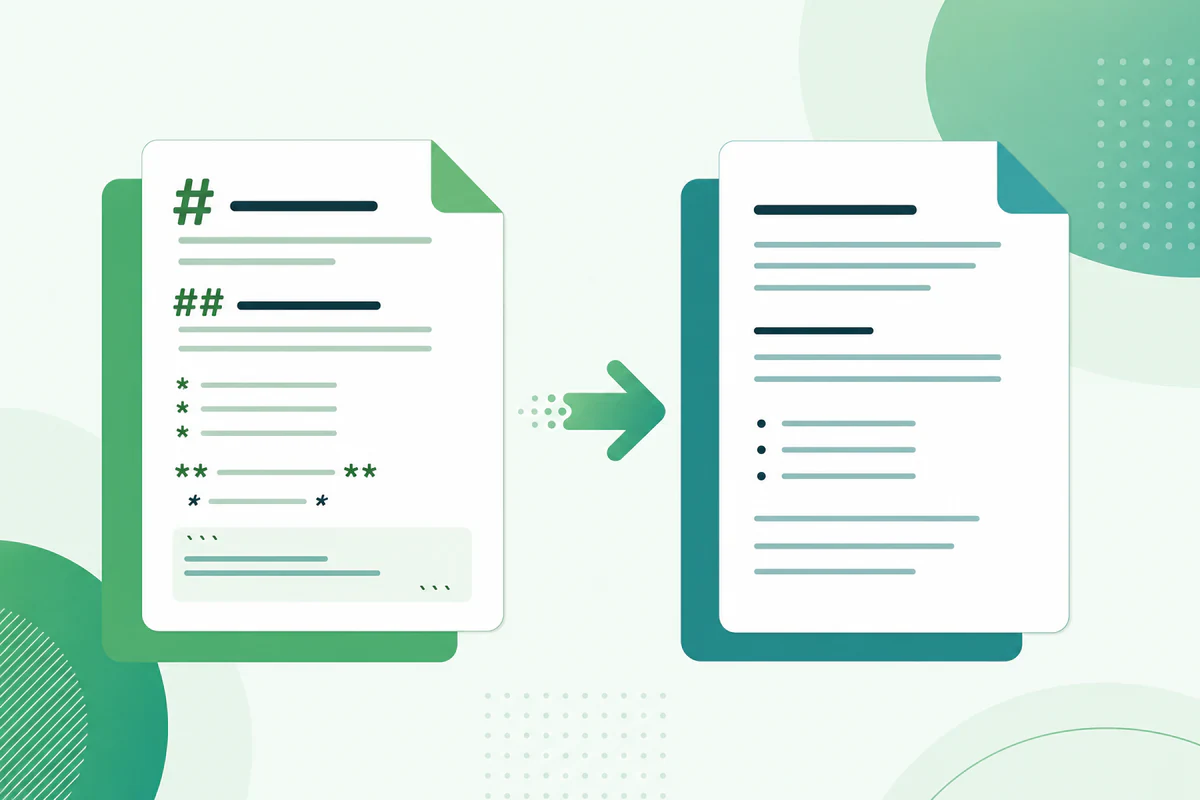
That is where markdown to txt conversion comes in. A dedicated converter strips Markdown syntax and gives you clean plain text you can drop anywhere.
This guide explains when plain-text export makes sense, how the conversion works, and the fastest way to convert Markdown to TXT online using PDFWritter.
Quick Answer
Markdown to TXT conversion removes all Markdown formatting symbols — headings, bold markers, link syntax, and code fences — and outputs readable plain text. PDFWritter's Markdown to TXT converter does this instantly in your browser with no file upload.
What is Markdown to TXT Conversion?
Markdown files are plain text with lightweight formatting markers. A heading looks like # Title. Bold text uses **bold**. Links appear as [text](url).
Converting Markdown to plain text means stripping those markers while keeping the readable content. The output is a .txt file — universal, lightweight, and compatible with every application on earth.
This is different from:
- Markdown to PDF — preserves visual formatting in a fixed-layout document
- Markdown to HTML — converts markers into semantic web tags like
<h1>and<strong> - Markdown to TXT — removes markers entirely, leaving raw readable text
According to the GitHub Flavored Markdown specification, Markdown was designed as a readable plain-text format. TXT export completes the circle by removing the syntax layer entirely.
Why Do People Convert Markdown to TXT?
Plain text remains the lowest-common-denominator format. Here are the most common reasons developers and writers export to TXT.
- Email and chat — paste clean content into Gmail, Outlook, or Slack without broken formatting
- LLM prompts — feed documentation to AI tools without
#and*confusing the model - Accessibility — screen readers and assistive tools handle plain text more predictably than raw Markdown
- Legacy systems — older CMS platforms, ticketing systems, and internal tools accept only plain text
- Word count and analysis — text analysis tools count words more accurately without syntax markers
- Archival simplicity — TXT files open in Notepad, Vim, or any editor without a Markdown parser
- SMS and notifications — push notification services and SMS gateways require plain-text payloads
- Database storage — store human-readable content in text columns without HTML or Markdown overhead
If your audience does not need formatting, TXT is often the right choice.
Key Features of a Good Markdown to TXT Converter
| Feature | PDFWritter | Manual Copy-Paste | Regex Scripts |
|---|---|---|---|
| Strips all syntax reliably | Yes | Partial | Depends on script |
| Handles nested lists | Yes | Often breaks | Often breaks |
| Removes link URLs cleanly | Yes | Leaves artifacts | Configurable |
| Preserves paragraph breaks | Yes | Inconsistent | Configurable |
| Code block handling | Strips fences, keeps code | Messy | Requires custom rules |
| Browser-based, no install | Yes | N/A | Requires setup |
| Client-side privacy | Yes | Yes | Yes |
| Table conversion | Flattens to readable rows | Breaks layout | Complex to script |
PDFWritter handles edge cases — nested lists, tables, blockquotes, and fenced code blocks — that manual methods miss.
Step-by-Step Guide: Convert Markdown to TXT Online
Step 1: Open the Markdown to TXT Converter
Go to the Markdown to TXT converter on PDFWritter. No account or installation needed.
Alternatively, start from the free converter hub and select the TXT export option.
Step 2: Paste or Upload Your Markdown
Drop your .md file into the editor, or paste Markdown text directly. The tool accepts standard Markdown and GitHub Flavored Markdown syntax.
If you need to write or edit first, use the online Markdown editor and switch to TXT export when ready.
Step 3: Review the Plain-Text Output
The preview pane shows your content with all formatting markers removed. Verify that headings read as plain lines, lists appear as indented text, and code blocks show only the code itself.
For complex documents, cross-check with the live preview tool to compare formatted and plain-text versions side by side.
Step 4: Download or Copy the TXT File
Click Download to save a .txt file, or Copy to paste directly into your email client, chat app, or AI prompt window.
The entire process takes seconds.
Best Use Cases
Developers
Strip README formatting before posting release notes to Slack. Convert API documentation to plain text for automated test assertions. Prepare Markdown content for full-text search indexing.
Technical Writers
Extract readable prose from formatted drafts for stakeholder review emails. Generate plain-text summaries of lengthy documentation for executive briefings.
Students
Convert assignment notes to plain text for plagiarism checkers that reject Markdown syntax. Paste study guides into flashcard apps that only accept TXT.
Content Teams
Prepare newsletter copy from Markdown blog drafts. Feed clean text into social media scheduling tools with character limits.
Data and ML Teams
Convert documentation corpora to plain text for NLP preprocessing, embedding generation, and training data preparation.
Legal and Compliance Teams
Strip formatting from policy documents before archiving in plain-text compliance systems that reject rich markup.
When to Choose TXT Over PDF or HTML
Plain text is not always the right export — but when it is, it is dramatically better than alternatives.
Choose TXT when the recipient cannot render Markdown or HTML — plain email clients, SMS gateways, terminal-based tools, and legacy ticketing systems. Choose PDF when layout, branding, and print quality matter. Choose HTML when the content publishes to a website or CMS.
A practical workflow: write once in the online editor, export TXT for the email summary, PDF for the attached report, and HTML for the internal wiki. Same source, three audiences, zero rewriting.
Plain Text and Accessibility
Screen readers handle plain text predictably. Raw Markdown, by contrast, reads punctuation aloud — "hash hash hash Heading" instead of "Heading." Converting to TXT before publishing in accessibility-sensitive contexts removes that friction.
Government and education sectors often require plain-text alternatives alongside formatted documents. The Markdown to TXT converter produces those alternatives in one click.
Benefits and Advantages
Universal compatibility. Every operating system, editor, and application opens TXT files natively.
Smaller file size. Without formatting metadata, TXT files are compact and fast to transfer.
Clean AI input. LLMs parse plain text more accurately than raw Markdown with syntax markers mixed into the content.
No rendering dependencies. Recipients do not need a Markdown viewer, browser extension, or special software.
Privacy preserved. PDFWritter processes conversion client-side — your documentation never uploads to a server.
Instant workflow. No Pandoc install, no Python script, no regex debugging. Paste, convert, done.
Reversible source. Your original .md file stays intact. TXT export is a one-way view, not a replacement.
Common Problems and Solutions
Problem: Plain text loses document structure
Solution: TXT export intentionally removes formatting. If you need preserved structure, use Markdown to PDF or Markdown to HTML instead. Use TXT only when plain content is the goal.
Problem: Tables look jumbled in TXT output
Solution: PDFWritter flattens tables into readable rows. For complex data tables, review the output and add manual spacing if needed. Alternatively, export to PDF for tabular layouts.
Problem: Code blocks include unwanted indentation
Solution: This is expected — code content is preserved without fence markers. Trim leading whitespace in your target application if needed.
Problem: Link text loses the URL
Solution: PDFWritter typically outputs link text. If you need URLs included, add them manually in the source Markdown as plain text before converting.
Problem: Regex-based stripping misses edge cases
Solution: Nested lists, inline code within bold text, and HTML blocks inside Markdown break simple regex scripts. Use a dedicated md to txt converter instead.
Problem: Need formatted output, not plain text
Solution: You picked the wrong format. Switch to PDF export for styled documents or HTML export for web publishing.
Comparison: PDFWritter vs Pandoc vs Manual Methods
| Feature | PDFWritter (Online) | Pandoc CLI | Manual Copy-Paste |
|---|---|---|---|
| Installation required | No | Yes | No |
| Strips all GFM syntax | Yes | Yes | Unreliable |
| Client-side processing | Yes | Yes (local) | Yes |
| Handles Mermaid blocks | Strips diagram code | Requires filter | Leaves raw code |
| Batch processing | One file at a time | Scriptable | Tedious |
| Learning curve | None | Moderate | None |
| Live preview before export | Yes | No | No |
For quick one-off conversions, PDFWritter is faster. For automated pipelines converting hundreds of files, Pandoc's pandoc input.md -t plain command remains the batch-processing standard.
Pro Tips
- Keep your Markdown source. TXT export is a derivative. Always retain the
.mdoriginal for future formatted exports. - Use TXT for LLM context windows. Strip formatting before pasting large docs into AI chat — cleaner input, better summaries.
- Preview first. Check the live preview to understand what formatting will be removed.
- Combine with PDF for dual delivery. Send stakeholders a PDF and paste a TXT summary in the email body.
- Write in the editor, export to TXT. The online editor lets you draft, preview, and export without switching tabs.
- Learn Markdown syntax once. Our beginner guide helps you write cleaner source files that convert more predictably.
- Use the converter hub. Bookmark the free markdown converter for quick access to TXT, PDF, and HTML export from one page.
Common Mistakes to Avoid
- Using TXT when you need PDF. Plain text has no bold, headings, or page layout. Choose the right format for your audience.
- Manually selecting rendered text. Browser selection misses hidden syntax and captures unwanted whitespace. Use the dedicated converter.
- Writing regex scripts for one-off tasks. A five-minute regex project is slower than a five-second online conversion.
- Forgetting about code blocks. TXT preserves code content but removes syntax highlighting. Mention this to recipients who expect colored code.
- Assuming URLs are included. Verify link handling in the output before sending to stakeholders.
- Uploading confidential docs to untrusted converters. PDFWritter processes everything client-side — verify the same for any tool you use.
- Deleting the Markdown source after TXT export. You will need the formatted version again eventually.
Batch Plain-Text Workflows
While PDFWritter handles one document at a time in the browser, you can build a simple batch workflow for multiple files:
- Open each
.mdfile in the TXT converter - Download the
.txtoutput with a matching filename - Store both versions in the same directory for reference
For automated batch processing of hundreds of files, Pandoc remains the better choice: for f in *.md; do pandoc "$f" -t plain -o "${f%.md}.txt"; done. Use the online tool for daily one-off needs; use Pandoc for CI pipelines.
Integrating TXT Export Into Your Documentation Workflow
Teams that write docs-as-code often store Markdown in Git and publish to multiple channels. Add TXT export as a final step for channels that reject formatted content:
- Slack announcements — paste plain-text release notes without
#headers showing as literal characters - Jira tickets — attach TXT summaries alongside PDF specs
- Email digests — body text in TXT, full report as PDF attachment
- Search indexing — some internal search tools index plain text more reliably than Markdown source
The free converter hub keeps TXT export one click away from PDF and HTML, so you never rebuild the same document in three tools.
Write once. Export to whatever format your audience needs. The Markdown to TXT converter is free, instant, and keeps your content private. No account, no upload, no formatting left behind. Start converting at pdfwritter.com today.
Frequently Asked Questions
Is Markdown to TXT conversion free?
Yes. PDFWritter's Markdown to TXT converter is completely free with no usage limits.
Does the converter upload my files?
No. Conversion runs entirely in your browser. Your content never leaves your device.
What Markdown syntax gets removed?
Headings (#), bold (**), italic (*), links ([]()), images, code fences, blockquotes, horizontal rules, and table formatting markers are all stripped.
Will the output preserve paragraph breaks?
Yes. Blank lines in your Markdown source become paragraph breaks in the TXT output.
Can I convert large Markdown files?
Yes. PDFWritter handles lengthy documentation including README files, API references, and multi-section guides.
How is TXT different from HTML export?
HTML export converts markers into web tags like <h1> and <p>. TXT export removes markers entirely, leaving raw readable text without any markup.
Can I use the output in ChatGPT or Claude?
Yes. Plain-text output is ideal for LLM prompts because it avoids syntax markers that can confuse language models.
Does PDFWritter support GitHub Flavored Markdown?
Yes. Tables, task lists, strikethrough, and fenced code blocks are all handled according to the GFM specification.
Is Pandoc better for batch conversion?
For automated pipelines processing many files, Pandoc's CLI is more scriptable. For quick individual conversions, the online tool is faster and requires no setup.
Can I convert back from TXT to Markdown?
Not automatically. TXT export is one-way. Always keep your original .md file as the source of truth.
Final Conclusion
Converting Markdown to TXT is a simple but essential step when you need clean plain text for email, chat, AI prompts, or legacy systems. Manual copy-paste and regex scripts fail on nested lists, tables, and code blocks — a dedicated md to txt converter handles them reliably.
PDFWritter's Markdown to TXT tool strips formatting instantly in your browser, with no upload and no account required. Keep your Markdown source, export plain text when you need it, and use the free converter hub for every other format.
Try the Markdown to TXT converter today and simplify your plain-text workflow.
Related Tools
- Markdown to TXT converter — instant plain-text export
- Markdown to PDF — formatted document export
- Markdown to HTML — semantic web markup
- Online Markdown editor — write and export in one place
- Free markdown converter hub — all tools together
- Markdown live preview — compare formatted vs plain output
- Complete converter toolkit guide — overview of every tool